To create a fantasy map for free, start with the place your story actually needs: a world, a continent, one island, or an archipelago. Generate a starting landscape, keep a useful seed, and turn a few locations into places with names and purposes. Then save both an editable file and an image you can share. A detailed coastline becomes useful when a reader or player can understand what lies on either side of it.
This walkthrough uses Map Generator Fantasy, a browser-based fantasy map maker with no account step. We follow an invented setting called the Lantern Coast, from a broad geographic idea to a small campaign handout. The generated images are original examples made with this site's map engine. The setting names and story details are fictional; the geography references explain real processes you can borrow when they serve your world.
Create your first fantasy map: the short version
- Open the fantasy world map generator for a broad overview, or choose an island or archipelago for a smaller setting.
- Choose an art style. Keep the default terrain controls for your first comparison so you can judge the land shape clearly.
- Generate a candidate. Once a shape works, record its seed and settings before changing anything substantial.
- Rename a starting settlement, a destination, and one landmark. Decide why someone would travel between them.
- Save the editable JSON map file, then export PNG, JPG, or SVG for your intended audience.
Those steps provide a usable first draft. The rest of this guide shows how to choose between the available map types, make island shapes meaningful, review geographic relationships, and prepare a readable export. You do not need to invent every town before your map is ready to support a story.
Choose a world, continent, island, or archipelago
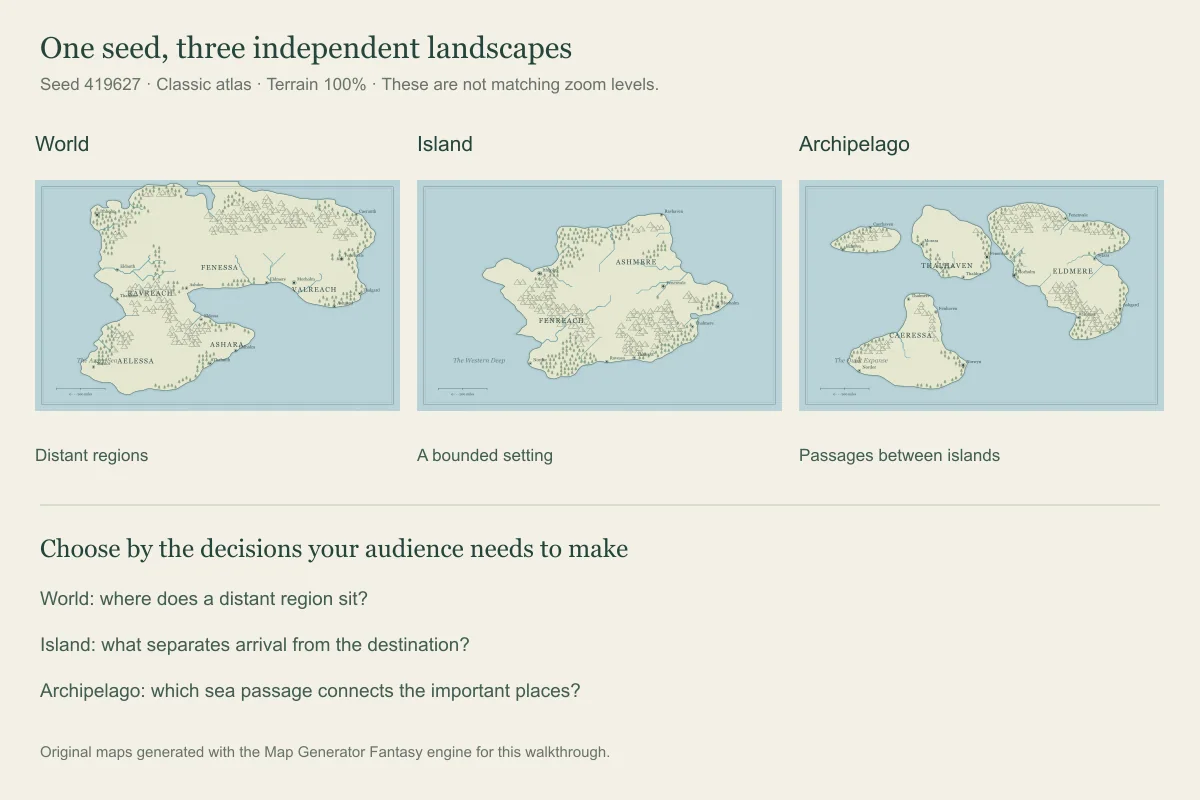
A world map creator is useful for relationships between distant regions: rival continents, an ocean crossing, or the location of a homeland. It is less useful for deciding where the party sleeps tomorrow. A continent map gives a kingdom or regional campaign more room for rivers, borders, and several connected settlements. Neither view needs to contain every local road or building.
An island map maker gives the story an immediately understandable boundary. Arrivals, departures, harbors, and inland barriers become easy to discuss. An archipelago map generator instead makes the water between islands part of the setting. A safe harbor, a remote outlier, and a dangerous passage can create different choices without requiring an enormous mainland.
For the Lantern Coast example, the campaign begins with boats traveling between settlements, so we choose an archipelago. The governing question is simple: why has the lighthouse at the outer harbor gone dark? A world overview could establish where these islands sit, but the immediate handout needs only the islands involved in that question. The map type guide helps decide which scope fits a different project.
A useful limit: changing from World to Island generates a different kind of landscape. It does not extract a matching close-up of an island already visible on the world map. If you need several maps of the same setting, choose which landmarks must remain consistent and carry them into your notes. Treat each generated view as a draft to reconcile, rather than assuming the views form a seamless geographic atlas.
Use a repeatable example instead of endless random maps
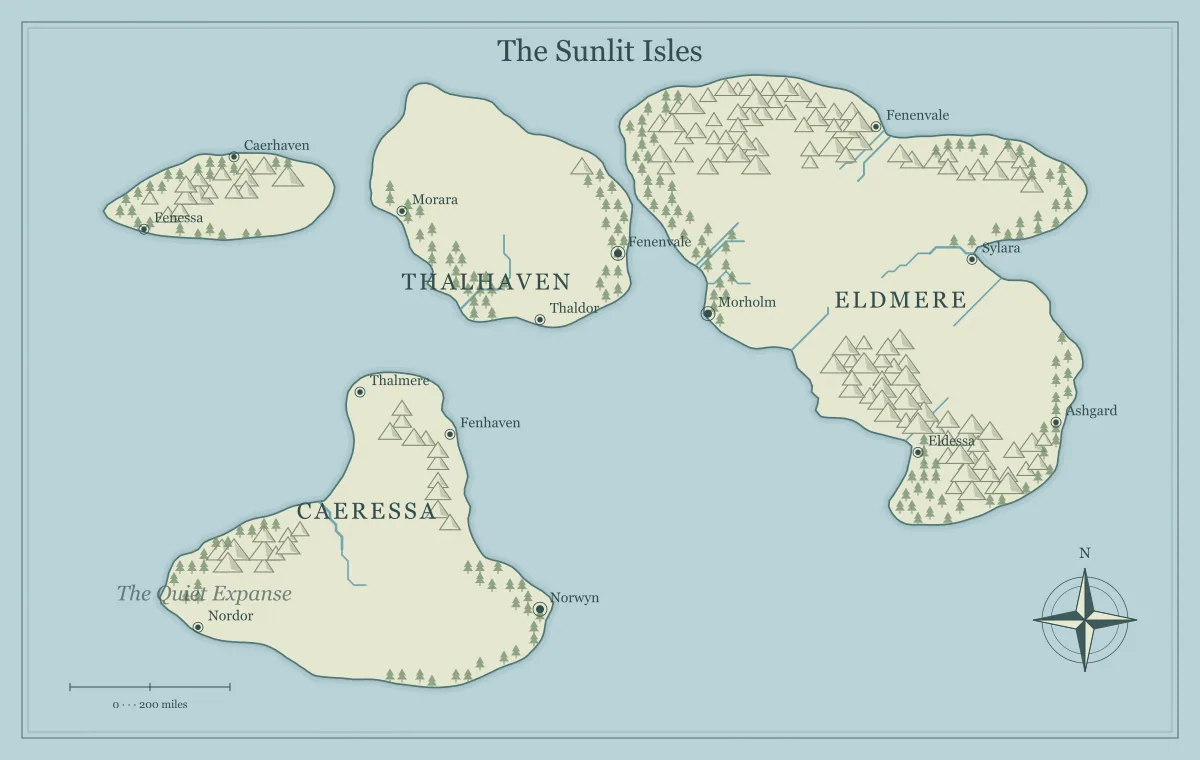
The hero image uses seed 419627, map type Archipelago, style Classic atlas, and Mountains, Forests, and Rivers at 100%. Labels, title, compass, and frame are enabled; the grid is off. These settings describe the generated starting image, before adding the Lantern Coast story names. In the current generator, selecting the same seed and settings recreates that starting landscape.
To try it, open the archipelago tool, select Classic atlas, and type 419627 into World seed. Click Generate a new map after entering the seed. Keep your settings written down: a seed by itself is not a complete project description, and different map types produce different results. For an edited map, save the JSON file because the seed does not contain all of your custom names and landmarks.
A random map generator is helpful for discovering possibilities. It becomes a distraction when every imperfect coastline triggers another complete restart. Compare a few candidates against a specific requirement: two useful landing places, a barrier between them, and enough open space for labels. When one candidate meets that requirement, keep it and spend your effort on decisions the reader or players will notice.
The guide to map seeds explains reproducibility in more detail. Save a working copy before changing the map type or regenerating, since those actions can replace the landscape and reset edits. A dependable backup is more valuable than remembering an attractive result that you cannot reconstruct.
Give island shapes a job in the story
Island shape ideas become stronger when they affect movement or settlement. A long island can place two communities far apart along the same ridge. A broad island with a central barrier can make a short-looking crossing difficult. A broken coastline can create several distinct landing places. A chain of small islands can make the availability of boats more significant than the distance between towns.
For the Lantern Coast, we interpret one large island as a market center and a smaller outlying island as the lighthouse's home. The water between them creates an obvious travel question. A sheltered-looking bay becomes a candidate harbor, but its safety remains a setting decision: an illustrated outline does not calculate depth, currents, tides, or storm exposure. Write down the assumptions that make the harbor work.
Real islands do not all share one origin. The National Park Service overview of volcanic landforms describes how eruptions build features including volcanic islands. That is one possible source of inspiration for a fantasy island chain, not a rule that every island must contain a volcano. Use the process when it helps explain a landmark, a resource, or a barrier in your particular setting.
For a focused set of silhouettes and story prompts, continue to island shapes for fantasy stories. This walkthrough uses shape as one step in finishing a map; that separate guide explores the choice itself. Before adding decorative detail, answer two questions: where can travelers enter, and what separates arrival from their destination?
Make the geography believable without pretending it is a simulation
A realistic fantasy map generator can mean two different things: an illustration that looks convincing, or a model that calculates physical processes. This tool makes geographic illustrations. Its terrain symbols, river lines, and scale reference help you develop a fictional setting, but they are not measured elevation data or a climate model. Decide which relationships matter to the story and review those deliberately.
Start with drainage. The USGS explanation of watersheds and drainage basins describes land draining toward a shared outlet, with ridges separating neighboring basins. On a fantasy map, use that relationship to ask where rainwater would collect and which barrier separates two river systems. It is a more useful review than placing blue lines merely to fill empty space.
In the Lantern Coast, a river reaching the market settlement gives us a reason for farms and inland transport to connect with sea trade. A ridge inland of the harbor can create a costly overland alternative. These are worldbuilding interpretations of the image. They do not mean the generator has simulated farming, shipping, or a town's economy. Follow the river design guide when a particular drainage pattern needs more attention.
Be equally precise about topography. A fantasy topographic map may use mountains and shading to suggest relief, but mountain icons are not contour lines. If a project needs numeric elevations, surveyed slopes, or a georeferenced terrain model, this illustrated map is not that deliverable. For a novel or campaign overview, a clear ridge, a pass, and a valley may communicate the relevant obstacles perfectly well.
Turn a landscape into kingdoms, towns, and names
A kingdom map needs reasons for people to occupy and control particular places. Instead of naming every region immediately, pick a resource, a crossing, and a point of authority. The Lantern Coast's market town handles cargo from neighboring islands. A harbor council controls the maintained docks. A distant lighthouse crew influences whether captains attempt the outer passage. Their relationships give the map a purpose.
Use the fantasy settlement generator to develop a town's livelihood, landmark, and current problem. Then check those ideas against its position. A settlement described as a busy river port needs a plausible connection to the river. A remote watch station needs supplies. You can use unusual or magical arrangements, but explaining their support makes the setting easier to understand.
For names, choose a small shared sound pattern and revise generated suggestions until neighboring places are easy to distinguish. The fantasy name generator can supply starting options for characters, towns, and realms. It does not establish ownership of a name or guarantee uniqueness. Before a commercial release, review important names in the context where you intend to use them.
Our working labels are Lantern Quay, the Outer Light, and the Reed Passage. These invented names describe functions that readers can remember. Rename the appropriate map labels or add text where the story needs it, then check their placement at the size of the final handout. The city placement guide offers a deeper review of water, routes, resources, and settlement roles.
Use the map for a DND campaign or island adventure
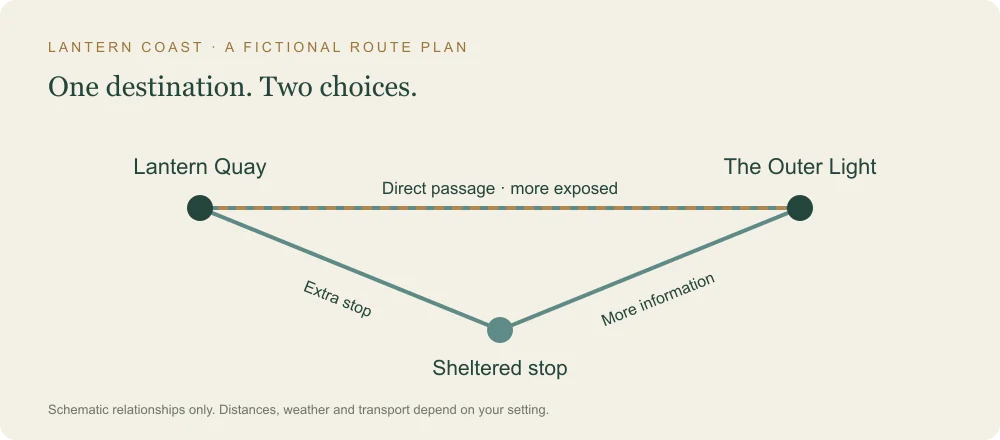
A D&D world map maker is most useful when it supports choices at the table. For this example, the players begin at Lantern Quay and must discover why the Outer Light failed. Give them a direct sea passage, a safer route with an extra stop, and a reason to investigate information before leaving. The drawing provides the geography; your notes explain what is currently happening there.
A DND map generator can help make the regional overview, but it does not replace encounter preparation. A harbor fight, lighthouse interior, or cave scene may need a separate tactical map. Keep that distinction explicit when sharing with players: a regional coastline is not a grid of five-foot combat squares, and a mountain symbol does not describe every climb across that area.
For a DND island map or one-shot, reduce the number of essential locations. An arrival point, an obstacle, and a destination are enough to establish a playable journey. Prepare the people or situations at those places, rather than making every generated icon an encounter. The island one-shot guide develops this smaller structure into a session plan.
Separate public knowledge from private notes. Players can know the lighthouse's position without seeing the hidden landing used by a rival crew. Export a player version and review every visible label, marker, caption, and filename. The player and DM map guide provides a systematic check. D&D names here describe a possible use of the map; this site is independent of the game's publisher and does not present the generator as an official rules tool.
Choose a scale and test one journey
A world map maker cannot decide how large your fiction needs to be. First choose the intended scale of the region: an afternoon's travel, several days, or a lengthy voyage. Then use that decision consistently in your notes. Treat the generated scale bar as an illustrative reference, not a measurement of real geography or an automatic movement calculation.
For an overland leg in the Lantern Coast, suppose the route is 24 kilometers and the group's assumed pace is 4 kilometers per hour. That is six moving hours before rests, obstacles, or investigation. The fantasy travel calculator lets you enter assumptions such as these. A sea journey needs its own transport assumptions; do not apply a walking pace to a boat simply because the path appears on the same image.
Test one important trip before fixing every distance. If the journey must fit in a session, there should be room for the decisions and scenes you want to play. If it is a novel's long passage, consider supplies and stopping places as well as movement. Use the scale and distance guide when the same setting will appear in several maps or chapters.
Make the map readable on mobile and at the table
A fantasy map maker on mobile benefits from a smaller editing task. Choose the map type and seed first, then zoom into one area to work on labels. Use fullscreen when it provides more space. Save an editable copy before a lengthy session; a browser tab closing, local storage being cleared, or changing devices can otherwise interrupt your work.
Review the exported image separately from the editor. A place name that looks comfortable on a large desktop screen may be too small in a group chat or printed handout. Keep the three important locations visually distinct and reduce competing labels near them. For a useful text alternative, describe what the image contributes rather than repeating a list of search keywords. The W3C guidance on informative images explains how alternative text communicates essential information when an image cannot be seen.
Download the right image and keep an editable backup
Choose PNG when you want a raster image with clear text and linework. JPG is another raster option for platforms or workflows that prefer it. SVG preserves vector shapes and can remain sharp when resized, although the receiving application must support it properly. Test the actual file in your destination instead of assuming every virtual tabletop, printer, or messaging service handles the formats identically.
The download resolution control changes raster output dimensions. For example, the generator's 1200 by 760 base canvas produces a 2400 by 1520 image at 2× resolution. Increasing that setting creates more pixels, but it does not add new towns or automatically make tiny labels easier to read relative to the whole map. Review the layout as well as the dimensions before printing.
Save the editable JSON file alongside the shared image. JSON retains the supported project settings and edits; an image export is the distribution copy. Keep filenames that identify the setting, audience, and version, such as lantern-coast-player-v1. The map export guide explains the format choices, while the editable file guide covers reopening and versioning your work.
Questions about free fantasy map creation
Is a fantasy map maker really free and usable without login?
Map Generator Fantasy provides map generation and supported image exports without requiring an account. The lack of an account also means you should keep your own saved files. Do not expect an account-based project library to recover a map after you clear browser storage or switch devices.
Can I make a fictional world, an alien continent, or a kingdom?
Yes, as an illustrated setting. Choose a broad or regional scope, interpret the generated geography, and add names and landmarks that fit the fiction. Unusual landscapes still benefit from a clear internal explanation. The tool does not calculate the physical conditions of an alien planet or automatically generate a complete political history.
Can a random island shape generator recreate an island from my existing world?
Changing the map type generates a new landscape rather than a matching close-up. Keep reference images and notes for features that must agree. A seed helps reproduce the current generator's starting result, while an editable map file is the better record of custom work.
Can I use the exported fantasy map in a book or campaign?
The site's terms of use explain use of the generated original maps. Review them for your project and check any text, artwork, or other material you add yourself. Save a final image, its editable source, and the notes needed to explain how you prepared the finished version.
Finish a small useful map before expanding the world
The Lantern Coast is ready for its first use when the audience can identify Lantern Quay, the Outer Light, and the travel choices between them. A whole world can grow around those places later. For now, a clear geographic idea, a repeatable starting point, and a readable export do more work than another page of unnamed detail.
Open the appropriate generator, choose a landscape that supports your purpose, and finish one route or region. Use the images here as examples of the process, not as a requirement to imitate their geography. The result should tell your audience where the important places are and give you a practical foundation for the story you want to tell.
Give the idea a world of its own.
Try the technique in the generator, then save an editable copy so you can return to your work.
Open the map maker ↗