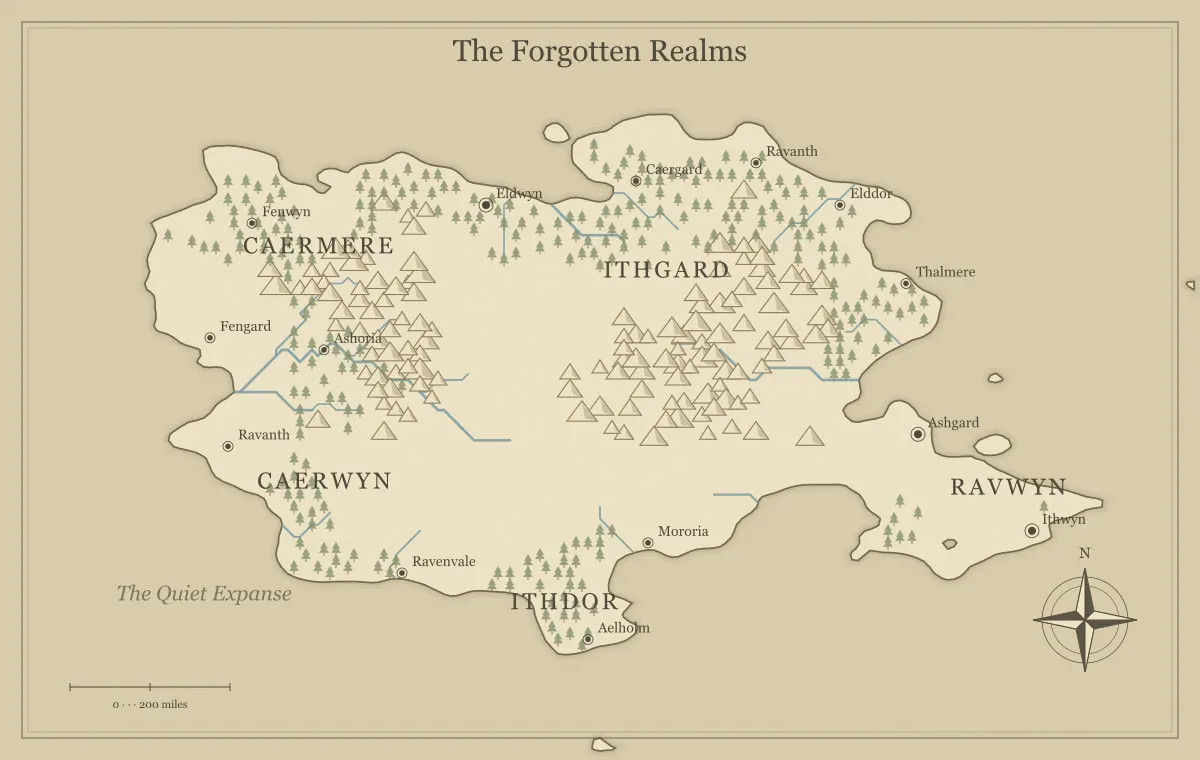
Cities on a fantasy world map become more convincing when their locations explain why people gather there. A port connects sea traffic to inland supply. A crossing town concentrates travelers. A capital may coordinate administration from a useful route network. These functions give the map relationships that a list of attractive names cannot supply. You do not need to calculate every household, but the important settlements should have understandable access to water, resources, and movement.
This guide develops an original region called the Copperwater Plain using the fantasy map maker. The generator supplies initial settlement labels and illustrated terrain. You can rename and move supported labels and add available landmarks, but moving a name is not the same as relocating every underlying generated symbol. We will focus on placement reasoning, select useful sites, and keep more detailed urban plans in separate notes or layouts.
Ask why the settlement exists here
Choose a primary function before deciding that a dot is a major city. Copperwater's main port handles cargo from the river valley. Its crossing town connects two roads through a ferry. Its inland market gathers goods from surrounding farms. Each location now has a reason to attract people and services. A town can have several functions, but one clear starting role helps you develop it coherently.
Compare the role with the geography. A harbor settlement needs a relationship to water and cargo access. A mining settlement needs resources and supply routes. An administrative center needs connections to the places it manages. The frontier town guide develops this reasoning through a ferry settlement, while trade routes connects production, movement, and markets.
Establish a dependable water relationship
A visible river can help explain a settlement, but the picture alone does not establish drinking-water infrastructure or safe daily access. Decide how the important city obtains water in your fictional setting. It may use wells, a spring, a maintained channel, or another established system. Keep the explanation at the level the project needs, and avoid assuming that proximity to a blue line answers every practical question.
If the city is distant from ordinary water, give that unusual placement a reason and consequence. A magical supply can work if its limits and maintenance are clear. The river guide connects waterways to drainage, crossings, and transport, while magical geography helps make exceptional infrastructure consistent. The settlement should remain understandable when the audience asks how people live there.
Connect the city to food and surrounding land
Decide where food comes from and how it reaches the settlement. Copperwater's port receives grain from the inland market and coastal food from nearby communities. Its map position connects those routes. You do not need a detailed agricultural model to identify the dependency, but a large settlement isolated from every supply connection needs a convincing explanation.
Keep climate assumptions consistent with the products you choose. If a particular real crop matters to the story, research its requirements rather than assigning it randomly. At a broader level, a note that the city imports a staple can be enough to create a useful relationship. The climate guide helps establish regional assumptions, and trade planning explains why a disrupted route can affect city life.
Use junctions to explain services
A place where routes meet can support lodging, storage, repairs, and information exchange. Copperwater's crossing town handles travelers arriving by road and river. Its repair yard exists because vehicles and boats need service there. Those functions make the location more memorable than a generic settlement name. They also explain why people with different interests encounter one another.
Not every junction becomes a major city. Decide which connections are important in your setting and what limits growth or access. A seasonal crossing may remain small, while a reliable bridge can support more regular traffic. The route guide distinguishes distance, effort, services, and uncertainty. Use those distinctions to explain the settlement's role rather than treating every line intersection as identical.
Place ports through a wider network
A coastal site becomes a port because of its use and infrastructure, not simply because it lies beside the sea. Decide how ships approach, where cargo moves inland, and which services support them. The generated outline does not measure harbor depth or prove safe access for every vessel. Establish the assumptions relevant to the story and keep them clear in the notes.
Copperwater's port connects a river landing to coastal routes. A smaller nearby town repairs boats but handles less public cargo. Their different roles create movement and cooperation. The coastline guide explores bays, headlands, and river mouths, while archipelago campaigns uses ports as part of a connected island network. A useful coastal settlement needs more than an appealing silhouette.
Use resource settlements with supply routes
A quarry, timber camp, or other resource site can support a settlement where people work, store material, and organize transport. Decide what arrives as well as what leaves. Copperwater's hill town sends stone toward the port but receives food and tools from the plain. That dependency gives the site a reason to connect to the wider map and creates consequences when the route changes.
Keep specific geological claims modest unless you have researched them. A fictional resource can serve the story without pretending every mountain symbol guarantees a particular deposit. The mountain guide connects resources to access, and forest planning develops work sites and routes. A resource town becomes believable through people and logistics, not only through a valuable material named in its description.
Treat defense as one factor among several
A defensible location can matter, but it still needs supply and a purpose. A hilltop station can watch a pass, while a city on the same hill may face different water and transport questions. Decide whether the place is primarily a fortress, an administrative center, or a broad settlement. Those roles can overlap without being interchangeable.
For Copperwater, the pass station protects a route rather than replacing the market town. It depends on supplies from below. If your capital occupies a difficult location for strategic reasons, record how those costs are managed. The faction guide connects control to assets, and frontiers distinguishes a claimed boundary from actual capacity to administer or defend it.
Choose capitals through authority and connections
A capital is a political role, not necessarily the largest settlement or the most central point on the image. Decide what institution it houses and why that institution operates there. The location may reflect history, route access, an agreement, or a strategic choice. Its current advantages and inconveniences can both shape the setting.
Copperwater's council meets at the inland market because several road communities reach it easily, while the port handles larger cargo traffic. This gives the region two important centers with different roles. The kingdom guide explores authority and geography. Keep a city's political label distinct from its economic function so a later change of government does not accidentally erase why people live there.
Build a settlement hierarchy the audience can use
Choose which places deserve prominence on this version of the map. A world overview may show capitals and major ports, while a regional handout may emphasize the home town and next destination. Do not assign every generated label equal significance just because it appears in the first output. The hierarchy should follow the map's purpose and the information the audience needs.
Use clear names and appropriate label sizes. Copperwater Port, Reed Crossing, and Hillmarket have distinct beginnings and functions, making them easier to discuss. The naming guide explains consistency and aliases, while label typography supports visual hierarchy. A long formal title can stay in the notebook instead of crowding a small marker.
Let past placement explain present oddities
A city can remain important after the condition that founded it changes. An old crossing may lose traffic to a new bridge. A former capital may keep institutions and cultural significance. A port may face a different trade pattern. Choose one historical change that matters to your project and record the evidence that remains in routes, landmarks, or local names.
This allows a settlement to have an inconvenient location without becoming arbitrary. Explain the history and its current consequences rather than inventing a new resource whenever someone asks why the city exists. The landmark guide connects past function to present situations, and maintenance helps track new changes as a campaign develops.
Apply the reasoning through supported edits
Rename a generated settlement that fits your concept, adjust its label appearance, and move the text to improve readability. Remember that label movement is not a universal relocation command for the underlying terrain artwork. You can add supported landmarks and text where appropriate, but extensive custom city geometry or a detailed urban footprint may require another workflow using a suitable export.
Save the editable file before a substantial pass and inspect the whole map afterward. The editing guide covers the available controls, while tool limits separates regional illustration from unrestricted drawing and local street planning. Keep the conceptual placement decision clear even when the visual implementation uses a simple label and supporting notes.
Test Copperwater through a supply interruption
Suppose the hill road closes temporarily. Identify which settlements lose a supply, which service becomes more valuable, and which alternative route can help. The hill town may need food, the port may lack stone for repairs, and Reed Crossing may receive more traffic. These consequences test whether the settlement network is connected rather than a collection of unrelated dots.
Give the audience useful information about those relationships. In a campaign, residents can explain dependencies through ordinary concerns. In a novel, the same network can support decisions and consequences without lengthy exposition. If you cannot describe a city's role beyond its name, develop that role before adding several more towns. A small set of clear relationships often creates a richer setting than a dense but unexplained population map.
Check the settlement against its location
After choosing a site, open the fantasy settlement tool and select the nearest setting: River, Coast, Mountain or Frontier. Compare the generated livelihood and landmark with the reason you placed the settlement there. A mountain mining town still needs a road to its buyers, and a coastal port needs somewhere boats can land. Use the population as a fictional planning estimate, then adjust it to fit your setting. Download the notes and keep your geographic reasoning beside the generated prompt.
Review the city network before export
Identify the main settlements, their water and supply assumptions, and the routes linking them. Check names against the notebook and view the labels at the intended size. Open the actual exported file and preserve the editable version using the export guide and saving guide. A city name should remain readable without hiding the geographic feature that explains its placement.
Good fantasy city placement turns terrain into an inhabited world. Copperwater's port, crossing, market, and hill town each have a purpose and dependencies. The generator offers starting geography, while deliberate decisions establish why people gather and how the places affect one another. Keep those relationships coherent, and the map can support stories, travel, and change instead of functioning only as a display of settlement names.
Give the idea a world of its own.
Try the technique in the generator, then save an editable copy so you can return to your work.
Open the map maker ↗