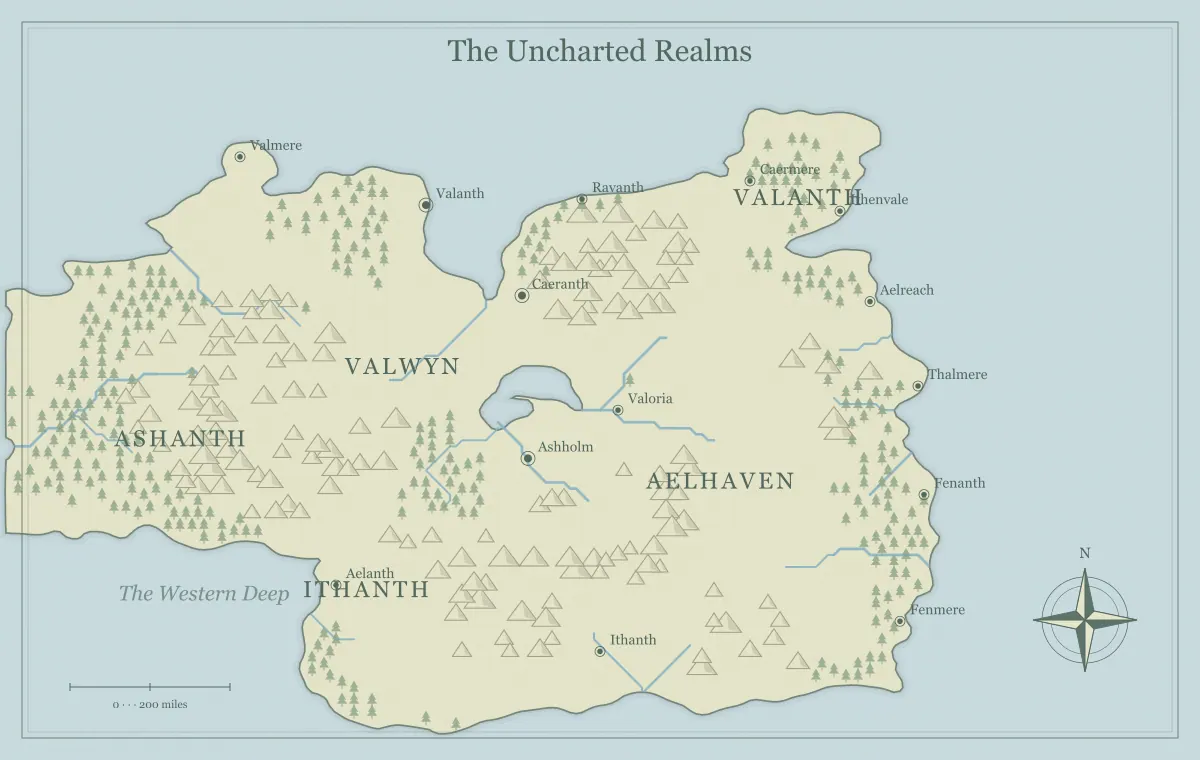
A fantasy map generator gives you a starting landscape, but quality depends on whether the finished map does the job you need. A coastline can be attractive while the main destination is hard to find. A campaign overview can contain accurate names while exposing a secret. An exported file can look sharp on your monitor while becoming unreadable on a printed page. A useful checklist catches these different problems without asking you to redesign the whole world every time.
This review uses a fictional region called the Westlight Coast. Its handout must show a harbor, a river route, and an inland pass. You can apply the same checks to a map from the fantasy map maker. Work through the checks at the intended viewing size, record only the failures that matter, and fix those failures before adding more decoration. The aim is a clear approval decision supported by evidence.
Check one: can you state the map's purpose?
Write the purpose in one sentence without using only aesthetic words. “Show the two routes between Westlight and the inland market” is testable. “Make an epic world” is too broad to tell you when the work is ready. If you cannot state the job, decide the audience and destination first. A world overview, a private planning map, and a player handout may require different levels of information.
Now point to the features that fulfill the purpose. If the handout should explain two routes, identify their starting place, destination, and meaningful differences. A missing route relationship is a substantive problem. An unnamed distant island may be irrelevant to this version. The map maker fantasy workflow helps establish the brief earlier, but this check is useful even when you have already generated and edited the map.
Check two: is the scope appropriate?
Compare the extent of the map with the audience's immediate decisions. A campaign beginning in one valley may not need a global overview as its primary handout. A novel spanning several continents may need a larger frame than one detailed harbor. Neither size is inherently superior. The map should show enough context to orient the reader without shrinking the important places until their labels become decorative specks.
On the Westlight Coast, the harbor and inland pass should occupy a meaningful portion of the image. If they are tiny features inside an enormous world, prepare a regional view or simplify the overview's purpose. If a larger map is useful for later context, keep it as a separate artifact. The map type guide compares world, continent, island, and archipelago frames through the kinds of movement and relationships they support.
Check three: do the important physical relationships make sense?
Review the major rivers, barriers, and settlement sites. Does the river route lead toward the places it is supposed to connect? Does the mountain pass actually represent a useful way across the ridge? Does the harbor have a plausible relationship to the sea? You do not need to validate every small feature as a scientific model, but the geography that drives the story should be understandable.
When something is unusual, ask whether the setting provides a reason. A city in a dry basin can work if it depends on a spring, imported water, or established magic. Without that reason, the map may contradict the explanation you give readers. Write the cause in your notes or adjust the setting. The river design guide and city placement guide provide focused reviews of two systems that often create these questions.
Check four: can someone understand movement?
A geographic image becomes useful for a journey when it explains how places relate. Ask a reader to identify the likely way from the harbor to the pass. If they cannot tell whether the journey follows water, a valley, or a coastline, clarify the map or the accompanying text. Not every route needs a drawn line, but the intended movement should not depend entirely on information you forgot to share.
Separate distance from travel time. A short path across rough ground can take longer than a wider route along a river. If you have not established a measured scale, do not make precise mileage claims from the picture alone. Use relative descriptions until you define the assumptions. The scale guide helps build a consistent framework, and campaign travel routes connects route differences to meaningful choices.
Check five: are the essential labels readable?
View the map at normal size, then identify the starting place, main destination, and largest region. If any of those labels is obscured or too small, fix the hierarchy before reviewing minor names. A title should not compete with every settlement, and a sea label should not be mistaken for a town. Watch for labels crossing rivers, markers, and busy terrain that make the words harder to recognize.
Check spelling against a name register rather than relying on familiarity. Similar-looking names can survive several revisions because your mind supplies the intended word. Read the most important labels aloud and compare them with chapter or session notes. The naming guide supports consistency, while label typography covers size and placement. A small local edit is often enough; you do not need a new coastline to fix a typo.
Check six: is the information appropriate for the recipient?
For a player handout, compare visible details with what the characters could know. Inspect markers as well as names. A concealed ruin may still be obvious if you removed its label but kept an unusual icon in an empty valley. Also check the title, legend, filename, and any surrounding caption. These can reveal information that you intentionally removed from the body of the image.
For a novel, consider whether the introductory map exposes a late reveal. A hidden realm can remain absent or appear as uncertain geography if that matches the story's viewpoint. Save public and private versions separately and verify the actual exported file before sending it. The player and DM version guide offers an information audit that also works for authors managing spoiler-sensitive illustrations.
Check seven: does style preserve meaning?
Look for essential information that depends on subtle color differences. If two regions become indistinguishable in grayscale, add a clearer explanation in text or change the presentation. If a textured or dark background makes small names difficult, revise the labels or choose another style for the reference version. Mood is useful, but it should not erase the map's central relationships.
Test the style in the destination rather than judging only the editor. The Westlight Coast may use parchment for a story handout and ink for a classroom print. Both should keep the same important names and geography. The art style guide explains the available options, while monochrome printing focuses on preserving hierarchy and contrast when color is unavailable.
Check eight: are precision claims supported?
Review any distances, travel durations, and boundary claims in the accompanying text. A generated scale bar is a storytelling reference rather than a survey. If you need a specific fictional distance, define it deliberately and apply the same assumption throughout the project. Avoid presenting a decorative overview as proof that a ship reaches an island in exactly a certain number of hours under all conditions.
Political borders need similar care. A colored region can suggest influence, legal control, or an approximate frontier; those are not always the same. Explain the intended meaning if the distinction affects the story. The borders and frontiers guide helps separate claimed territory from practical control. Consistency matters more than false precision, especially when a map is an illustrative tool rather than a detailed simulation.
Check nine: can you return to the approved work?
Download an editable JSON file and give it a meaningful version name. Then import it when practical and inspect the restored map. A file that you have checked is stronger evidence of recoverability than a browser storage indicator or a remembered seed. Keep the final picture beside the working data because it records the approved visible result even if a later software version interprets generation inputs differently.
Check that your filenames distinguish public and private versions. Westlight-player-v2 and Westlight-private-v2 are more useful than final and final-new. Write one sentence explaining the version's purpose and approval state. The editable map guide explains a lightweight backup routine. Saving should take a small amount of time compared with rebuilding labels and manual additions after the only local copy disappears.
Check ten: does the delivered file work?
Open the downloaded PNG, JPG, or SVG in the receiving workflow. Check the whole image, the title, the smallest essential label, and the frame. For print, set the intended physical size and inspect a test. For a virtual tabletop or chat, confirm that upload handling does not make the map unreadable. The actual file is the deliverable, so its behavior matters more than an attractive preview in the generator.
If a format causes a problem, identify the specific failure before changing everything. Font substitution in an SVG suggests a receiving-application issue. Soft tiny text in a JPG suggests compression or dimensions. A clipped frame in print suggests placement or margins. The export guide connects those symptoms to practical checks. Make the smallest effective correction and export the affected version again.
A short Westlight review record
Suppose the first handout passes the geography check but fails two delivery checks. The harbor name disappears at print size, and the file still contains a private watchtower marker. Record those separately. The label needs a visual correction; the watchtower needs an audience correction. A new terrain seed would address neither failure directly. Save the working file, make the two relevant changes, and export the player version again.
Now repeat the label and information checks on that new export. If the harbor is readable and the private marker is absent, approve the handout while keeping an optional note about improving a distant forest later. This record shows why the map is ready and why the unfinished decorative idea does not prevent delivery. It also makes a later revision easier to explain.
Turn the checklist into an approval decision
Record unresolved failures as a short list with concrete actions. “Move the pass label clear of the ridge” and “export the player version instead of the private version” are actionable. “Improve the whole map” is not. Resolve the failures that prevent the purpose from being met, then repeat only the affected checks. You do not need to inspect every unrelated aspect after correcting one spelling error.
When the map supports its purpose, the information fits the audience, the output works, and the working data is saved, approve that version. Keep optional improvements in a separate future list so they do not delay a usable handout. The publication review guide adds context for important releases. This checklist succeeds when it helps you finish a map with confidence and maintain it later, rather than turning every draft into an endless audit.
Give the idea a world of its own.
Try the technique in the generator, then save an editable copy so you can return to your work.
Open the map maker ↗