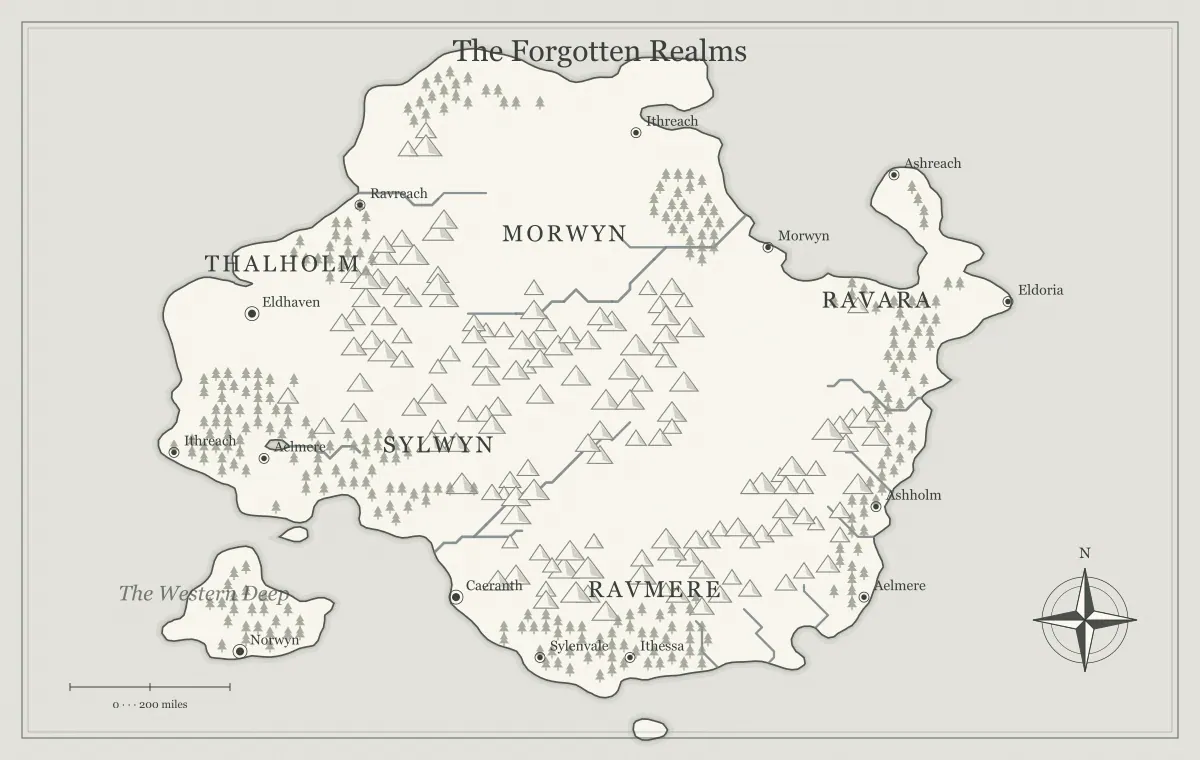
A campaign map serves two different jobs at the table. Players use it to understand what their characters know and decide where to go. The game master uses it to organize situations, concealed locations, and consequences that have not yet become visible. Trying to make one image serve both audiences can reveal secrets or produce a handout so vague that it is hard to use. Separate versions let you keep the same geography while controlling the information each audience receives.
This guide builds player and DM views of an original fictional region called the Raven Reach. Use the DND world map maker to create the region, then save working files for the two audiences. The tool is independent of Dungeons & Dragons and its publishers. The method applies to other tabletop campaigns too: distinguish public knowledge from private preparation, review the actual exports, and preserve clear versions as the story changes.
Begin with what the characters could know
A player map is not necessarily an objective record of the entire world. It can represent a common regional chart, a merchant's sketch, or the characters' accumulated knowledge. Decide its viewpoint before selecting labels. A reliable merchant chart may show ports and common routes while omitting inland ruins. An old local map may show a road that no longer operates. Both can be useful if their limitations are clear.
For the Raven Reach, the characters begin in Ravenford and own a recent traveler's chart. They know the river towns, the main ridge, and the road toward White Pass. They do not know the location of an abandoned watch post used by smugglers. That distinction gives you an information rule you can apply consistently. The campaign world guide connects these known places to a starting problem, travel choices, and nearby locations.
Make a knowledge inventory outside the image
List the important features in a small table or text note. For each one, record whether it is known, rumored, unknown, or private preparation. Ravenford is known. The pass closure is known but its cause is uncertain. The old watch post is rumored in general terms, while its exact site is private. This inventory separates the decision about knowledge from the visual action of placing a marker.
Also record the source of uncertain information. A ferryman's rumor and a surviving official chart carry different expectations. If a player asks why the map shows a settlement they have never visited, you can explain that it came from the chart rather than inventing an answer during play. Keep the inventory compact. It should help you prepare the next session, not require a complete intelligence history for every distant mountain.
Save a shared geographic baseline
Choose and approve the main terrain before splitting the versions. Save an editable JSON file and a reference image. Record the seed, map type, and relevant settings. That baseline helps both versions remain recognizably the same region. It also prevents a later map from accidentally moving a major coast simply because you regenerated while preparing the private version.
A seed is useful but does not replace the working file once you have changed labels or added landmarks. Keep the baseline under a clear name such as raven-reach-base-v1. The seed guide explains reproducibility, and editable map saving explains recovery. The baseline is not a third audience map; it is the stable starting record from which both audience-specific views can grow.
Build the player version first
Create a readable public overview with known settlements, major physical barriers, and the places that support the next decisions. Label Ravenford, White Pass, and the ferry town. Keep the map's title neutral. Avoid adding private landmarks now merely because you plan to hide them later. A clean player file is easier to audit than a crowded private file from which you hope you removed every revealing detail.
Keep essential information in accompanying text too. Explain that the pass road is currently unreliable and that the river offers another route. The image can show geographic relationships while the text explains the known condition. Do not assume a subtle color or tiny symbol communicates everything. The travel routes guide helps turn those visible choices into usable information without exposing what happens at every destination.
Branch into the private preparation version
Save the approved player working file, then make a separate private version. Add supported labels or landmarks that help you organize concealed locations. For the Raven Reach, the private map can identify the watch post and the likely smugglers' landing. Keep detailed encounter notes outside the image, linked by location name. A regional map is a useful index, but it becomes harder to use if every marker contains a paragraph of secret text.
Give the private file and its exports unmistakable names, such as raven-reach-dm-v1. The filename is part of your handling system, especially when several pictures sit in the same downloads folder. Avoid using a private map as the source for a quick player share link unless you have carefully reviewed the included settings and edits. The sharing guide explains why the full link can disclose the information it contains.
Audit more than the text labels
A secret can leak through an unlabeled symbol, an unusually precise route, a title, or the surrounding explanation. Inspect every visible mark on the player export. If an icon points directly to the concealed watch post, deleting its words is not enough. The safest early workflow is to leave the private feature out of the player branch entirely rather than relying on a visual trick to hide it.
Also check captions, legends, filenames, and the document in which you place the image. A player map named raven-reach-secret-smuggler-base.png reveals more than its neutral title suggests. A presentation slide note can do the same. Review the actual distribution package as the recipient will see it. The final review guide treats delivery context as part of the map, rather than checking only the editor's visible canvas.
Represent rumors without pretending certainty
Rumored information can enrich a player map when its uncertainty is explicit. You might show a broad valley labeled “Old Watch, location disputed” rather than placing a precise marker on the actual site. Alternatively, keep the rumor in nearby prose and leave the map blank. Choose the method that fits the fictional source and avoids suggesting a level of accuracy the characters do not possess.
Do not use uncertainty as an excuse to make every useful feature unreliable. Players need enough stable information to make meaningful choices. Known river towns and major barriers can remain clear while a remote ruin is uncertain. If an old chart proves wrong, make that a discoverable part of the fiction. The hidden realms guide explores the difference between a place being concealed, inaccessible, and simply absent from a particular viewpoint.
Separate known routes from prepared encounters
The player map can show a road without showing every encounter you expect along it. The private map or notebook can track a washed-out bridge, an occupied toll station, or a faction patrol. Describe only the route conditions the characters have reason to know. This leaves room for discovery while making the initial decision meaningful. A route should not become a blank lottery simply because you are protecting secrets.
For the Raven Reach, the players know the river route requires a boat and the road approaches a guarded pass. They may not know that the toll station shelters refugees. That discovery can change their plans without contradicting the map. The sandbox campaign guide explains how to connect several destinations without forcing one route, while faction mapping distinguishes visible control from private intentions.
Keep style differences purposeful
You can use the same style for both versions to make comparison easy, or choose a different private presentation if it improves your preparation. The geography and important names should still match. A style difference should not accidentally change what players infer about the world. If the player version looks like a fictional old chart, explain that viewpoint instead of letting readers assume every omitted feature is physically absent.
Readability matters for both audiences. A private map crowded with pale notes may be harder to use than a simpler map plus a location index. A public map with too many minor labels can bury the places players need first. The style guide and label typography guide help maintain hierarchy. Keep secret detail in the most usable form, not necessarily all on the image.
Update knowledge after discovery
When players discover a place, decide whether the public map should gain a label, a marker, or a note. This is a change in knowledge, which may be different from a change in the world. The watch post existed before the characters found it; the new handout now records their understanding. Keep the older version if it matters to the history of the campaign.
After each relevant session, revise the player and private files deliberately. A faction's occupation can be a world change, while a corrected rumor is a knowledge change. Record the distinction in a short note so later versions remain coherent. The between-session guide provides a maintenance routine. Updating only the affected information is usually more useful than regenerating the region whenever the campaign advances.
Check a Raven Reach release folder
Before sending the Raven Reach handout, place only the approved player image in the distribution folder. Open it from that folder, confirm Ravenford and White Pass, and inspect the valley where the private watch post exists. Then check the filename and accompanying message for accidental disclosure. This reviews the material you will actually send rather than a similar image still open in the editor.
Keep the private working file in the preparation folder with a clear audience label. When the group discovers the watch post, create a new player version instead of renaming the private export and hoping its remaining details are harmless. The release folder then contains a deliberate public artifact, while your broader notes and private markers remain useful for later sessions.
Verify the file you are about to share
Open the exported player image and check its title, known places, concealed features, and filename. If you are using a share link, review the working version before copying it. Keep the private export out of the same distribution folder when practical, and label the approved public file clearly. These ordinary handling steps reduce mistakes without requiring a complicated publishing system.
Save both editable versions and the approved pictures in your campaign archive. The export guide explains format and size checks. A successful player and DM split preserves useful geographic continuity while giving each audience the right information. The Raven Reach can then become a shared place the group explores, while your private preparation remains a tool for responding to their choices instead of a secret accidentally printed on the first handout.
Give the idea a world of its own.
Try the technique in the generator, then save an editable copy so you can return to your work.
Open the map maker ↗