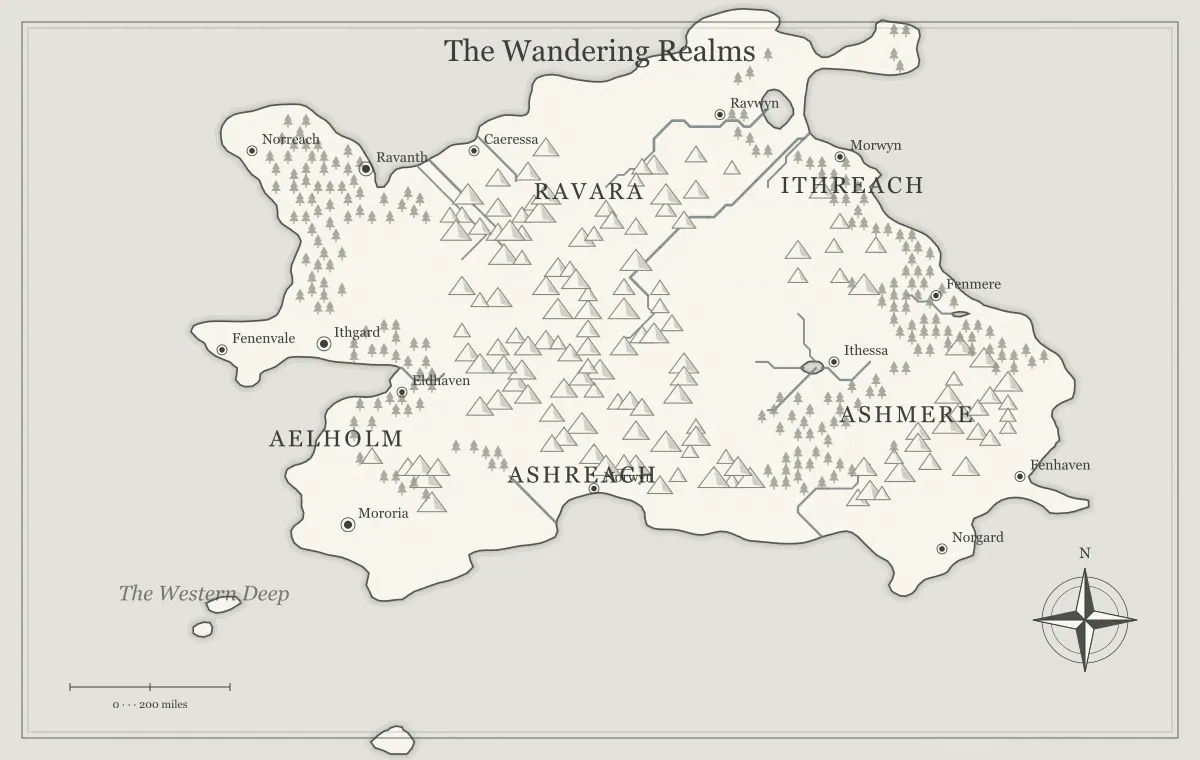
A fantasy map should remain understandable when color is unavailable. Your reader may print a campaign handout in black and white, view a grayscale copy, or have difficulty distinguishing particular hues. A map that depends entirely on colored regions can lose its meaning in those situations. Designing for monochrome begins with the information structure: names, positions, symbols, and explanations should carry the essential relationships, while color adds another useful cue.
This guide prepares a fictional map called the Silverfen March for a monochrome campaign packet. The creator starts with a generated map, simplifies its information, and checks a grayscale proof in an external image or layout application. The website offers an ink art style but does not provide a dedicated grayscale conversion or print-production control. Keep the original source while preparing the intended distribution edition.
Identify essential information
List the information readers need to use the map. Silverfen's players must find the starting village, the river crossing, the western road destination, and the mountain pass. They also need to distinguish two broad regions. The creator does not need every forest cluster to be prominent or every minor settlement to be named. This priority list determines what must survive the monochrome review.
Write the main relationships in a short paragraph before changing the illustration. The village is south of the crossing, the pass lies beyond the western destination, and the northern region has a separate route. If those relationships cannot be explained clearly in words, the image may be carrying an unresolved planning problem. A grayscale conversion cannot fix a world whose important places are still undefined.
The planning checklist can help establish purpose. Monochrome preparation is a focused edition of the same world, not necessarily a new generation. Preserve the approved geography unless the review reveals a reason to change it.
Separate brightness from hue
Two colors can look different in hue while becoming similar gray tones. A muted red and muted green region might be easy for one reader to separate on screen but difficult to distinguish in a monochrome print. Examine a real grayscale proof rather than guessing from the color version. The exact conversion and printing process influence the result, so the proof belongs to the actual workflow.
Silverfen's color map distinguishes water and land partly through palette. In the grayscale proof, coastline lines remain clear, but pale decorative textures become less distinct. That is acceptable if they are background. A faint label disappearing is more serious because it removes useful information. Evaluate the consequences of each change rather than expecting every decorative feature to survive with identical emphasis.
Do not turn every element into the darkest possible ink. If terrain, names, water, and frame all have equal intensity, the map can become a dense field of marks. A clear hierarchy gives important names and geographic edges enough presence while keeping supporting texture quieter. Monochrome has a range of values, not only pure black and blank paper.
Choose a suitable starting style
Try the generator's ink style as a starting point when it suits the project. Also compare other styles if their linework and background create a clearer result. A style name is not proof that the final print will meet your needs. Inspect the actual map with its current names, terrain density, and intended placement size. Different geography can create different crowded areas within the same palette.
Save a source before changing styles so you can compare deliberately. Style changes and display choices should be reviewed alongside supported edits. A label color chosen for a pale background may need adjustment against another presentation. The surrounding website's dark theme does not determine the colors inside the exported map; review the map itself.
The art style guide discusses presentation choices. For Silverfen, the creator compares a parchment edition and an ink edition at the same intended size. The decision is based on readable places and routes, not solely on which large browser preview looks more dramatic.
Make labels independent of color
Use distinct names and clear placement so important categories do not rely on ink color. If the map's blue names are allied towns and red names are rival towns, that distinction may vanish in monochrome. State the relationship in a key, a short note, or the place names themselves where appropriate. The reader should be able to identify the relevant location without correctly perceiving a hue.
Silverfen's creator names the two regions North March and Riverward. Their labels sit in separate open areas, and the campaign notes explain their relationship. The map does not attempt to define exact political polygons through colored areas. If precise borders matter, prepare a suitable boundary illustration and review it separately. The geographic generator's region labels alone do not establish exact ownership.
The typography workflow provides a useful naming and placement pass. Check long labels, short similar names, and text over dense terrain. Moving a generated label changes its text position rather than relocating the underlying settlement marker, so preserve a clear association after every move.
Use distinct symbols deliberately
Symbol shape can support distinctions that color alone cannot carry. A castle symbol and a town symbol can be visually different even when both use the same ink. Use a small, consistent vocabulary of symbols and explain unusual meanings in a key. Do not invent a separate symbol for every minor category unless the map needs that complexity.
The generator supports several added elements, including a castle, town, mountain, tree, and text. These additions can emphasize useful places, but they do not automatically become a complete custom legend system. Prepare any necessary key in accompanying text or your layout. Make sure the key describes the symbols actually present in the distributed edition.
Silverfen adds one castle landmark that matters to the route decision. The creator avoids scattering extra castles as decoration because readers might interpret them as comparable destinations. A symbol is useful when its meaning is consistent. If a decorative mark looks like an important location, either clarify its role or reduce its prominence.
Simplify busy terrain
Dense forests and mountain clusters can compete with names when printed small. Review the busiest areas in the grayscale proof and ask which details support the map's purpose. The generator's broad terrain controls can change amounts, but they are not unrestricted tools for deleting every individual terrain symbol. Preserve the source before experimenting with those controls.
For Silverfen, the western region has several important labels over busy terrain. The creator moves text into open space, shortens one name, and reduces incidental labels. A simpler map edition can communicate the campaign more clearly without pretending the terrain is absent from the fictional world. The notebook can preserve details that the handout does not need to display.
The forest design guide and mountain guide help distinguish geographic purpose from graphic density. A symbol cluster suggests terrain; it does not need to represent every tree or peak. Treat the illustration as a communication tool rather than an inventory that must remain maximally detailed.
Review rivers and coastlines
Check whether important river paths and coastline boundaries remain readable. They can help orient a monochrome map when color no longer separates water and land strongly. A river crossing that matters to the story should be identifiable from the map and its notes. If a pale line becomes lost among terrain marks, consider a simpler presentation or a separate written route explanation.
Silverfen's campaign depends on one crossing, so its label is important. The creator does not assume the generated river illustration specifies exact channel width, depth, or crossing conditions. The notes explain that the crossing is usable under ordinary circumstances and difficult after flooding. That information survives regardless of subtle changes in printed line appearance.
The river guide discusses geographic reasoning. Monochrome review asks a narrower question: can the reader find the relationship that matters? Keep the physical fiction and its graphic representation connected without treating every line weight as a scientific measurement.
Prepare a separate grayscale proof
Export the approved image and make a grayscale copy using an appropriate application. Preserve the color image and editable source. Name the proof clearly so it is not mistaken for an approved final edition. If the production destination will convert the file itself, review its instructions and proof process rather than assuming your local conversion predicts every aspect of the final result.
Open the proof at the intended placement size. Compare it with the color edition and identify lost information, ambiguous symbols, and labels that are too faint or small. A grayscale proof is an inspection tool; it does not need to preserve the same emotional effect as the original palette. Its job is to show whether useful information remains available.
The format guide explains raster and vector handoffs. A PNG can provide a fixed reference, while SVG may support additional artwork preparation in a compatible program. The grayscale preparation happens in the chosen workflow, not automatically because you select a particular file extension.
Check the actual print size
Place the monochrome map at its planned physical size and examine an actual-size sample where practical. Enough pixels help preserve detail, but a name can still be physically tiny. If an eight-inch map has unreadable lettering, increasing its raster multiplier alone does not make the same name larger on paper. Revise the typography or the placement size.
Silverfen's creator prints a sample and asks another reader to find three locations. The reader can identify the crossing but confuses two town names near the coast. The creator changes the label placement and exports a new edition. This test reveals a practical issue that was easy to overlook in a large editing view.
The print resolution guide gives the pixel-to-size calculations. Use the actual destination's production requirements when preparing the final document. A local sample can expose physical readability problems while still differing from the final printer's colors, paper, or reproduction behavior.
Write a useful companion key
A short key or place list can make the handout more useful. Explain the symbols that need interpretation and identify the few locations relevant to the session. Avoid a dense legend that forces readers to consult another page for every mark. The key should support the map's purpose and match its edition.
Silverfen's key identifies the castle as an abandoned watch station and the town symbols as known settlements. It also states the broad route from the starting village through the crossing to the western destination. This paragraph helps readers who cannot interpret the picture easily or are consulting a small copy. It does not reveal the secret passage that belongs only in creator notes.
The audience edition guide applies to keys and captions too. A map can hide a secret label while an accompanying explanation reveals it. Review the whole handout, not just its image, before distribution.
Complete the Silverfen review
The creator chooses the clearer style, checks important names, keeps symbol meanings consistent, and makes a grayscale proof. The actual-size sample reveals one coastal ambiguity, which is corrected. The final handout includes a small place key and a written route summary. The approved monochrome image receives its own edition name alongside the color source and generator JSON.
The campaign can now distribute a black and white packet without expecting players to remember colored territories from an earlier screen preview. The color edition remains useful for another setting, but the monochrome handout has been reviewed for its own conditions. That is the central habit: inspect the artifact people will actually use rather than treating an attractive original as proof that every copy will work.
Use the final review checklist before publication and return to the fantasy map maker for supported changes. A strong monochrome map has readable names, distinct useful symbols, clear geographic relationships, and enough written context to remain understandable when color no longer helps.
Give the idea a world of its own.
Try the technique in the generator, then save an editable copy so you can return to your work.
Open the map maker ↗